

A comprehensive step-by-step guide designed to help educators resolve technical issues efficiently during online teaching.
This project addressed a critical challenge in online teaching environments: ensuring seamless technical operations during live sessions. The guide equips educators with structured, practical solutions to resolve technology-related disruptions quickly and effectively.
Users learn a systematic approach to identifying problems, applying immediate fixes, and knowing when to escalate issues to appropriate support channels, minimizing disruptions to their teaching flow.
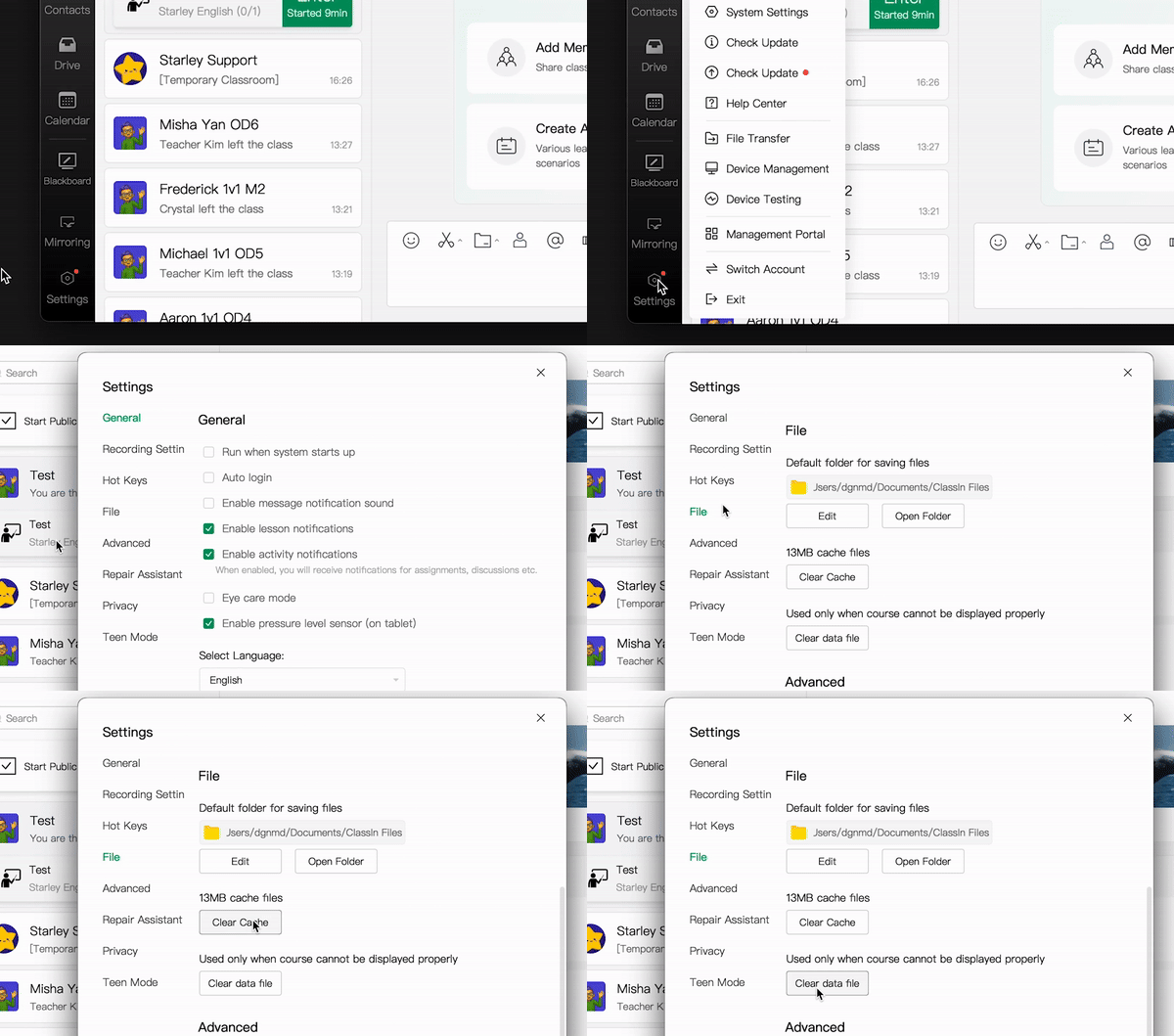
Focused lessons addressing specific technical issues such as connection problems, login errors, and incorrect assignments, ensuring users can quickly identify and resolve common challenges.
Real-world examples guide users through recognizing patterns and applying systematic troubleshooting techniques, making abstract concepts concrete and applicable.
Step-by-step instructions on identifying when to escalate an issue and how to communicate effectively with support teams, preventing unnecessary delays.
Knowledge checks and quizzes reinforce key concepts and build users' confidence in applying their troubleshooting skills independently.
The online teaching environment was frequently interrupted by technical difficulties. Educators lacked a standardized approach to troubleshooting, leading to lost teaching time, frustrated students, and increased support tickets.
I conducted a thorough analysis of common technical issues and existing workflows, collaborating with the IT team to identify recurring problems. This research phase revealed patterns in technical disruptions and highlighted gaps in the current support structure.
The course was structured around microlearning principles, breaking down complex troubleshooting processes into concise, actionable steps. Interactive elements, including scenario-based learning and knowledge checks, were integrated to reinforce key concepts and build user confidence.
The resulting technical troubleshooting guide provided a centralized, user-friendly resource that enabled educators to quickly resolve common issues without interrupting their teaching flow. A clear, step-by-step approach ensured consistency in problem-solving and reduced dependency on support teams.
Average decrease in resolution time for technical issues
The course significantly reduced the average resolution time for common technical issues, allowing users to operate more independently and reducing the strain on support teams.
By standardizing troubleshooting practices, the project improved consistency across workflows and enhanced overall productivity. Users reported greater confidence in managing technical disruptions, leading to smoother operations and fewer interruptions.